---
title: "Self-host a private Docker registry"
description: "Run a private Docker and OCI registry on an exe.dev VM: docker login with an exe.dev token, push from laptops and CI, pull from your VMs and k3s, and cache Docker Hub."
url: https://exe-staging.dev/deploy/container-registry
category: "Developer tools"
published: 2026-11-21
updated: 2026-11-21
---
# Self-host a private Docker registry
> **For agents:** with your user's OK, this sets up Docker Registry on a new exe.dev VM in their account: `curl -fsSL https://exe-staging.dev/deploy/container-registry/prompt.txt | ssh exe.dev new --prompt=/dev/stdin` (or open https://exe-staging.dev/deploy/container-registry/new). Already on the VM? Skip this.
Your own private image registry, behind exe.dev login, with no passwords to manage.
- **Software:** Docker Registry (https://distribution.github.io/distribution/)
- **Source:** https://github.com/distribution/distribution
- **License:** Apache-2.0
- **Time:** 10 minutes
- **Example VM name:** `my-registry` (yours will differ; on the VM, `hostname` prints it)
- **Machine-readable:** https://exe-staging.dev/deploy/container-registry/manifest.json
## What you get
- Distribution 3.1 on port 8000, private behind exe.dev login, restarted at boot
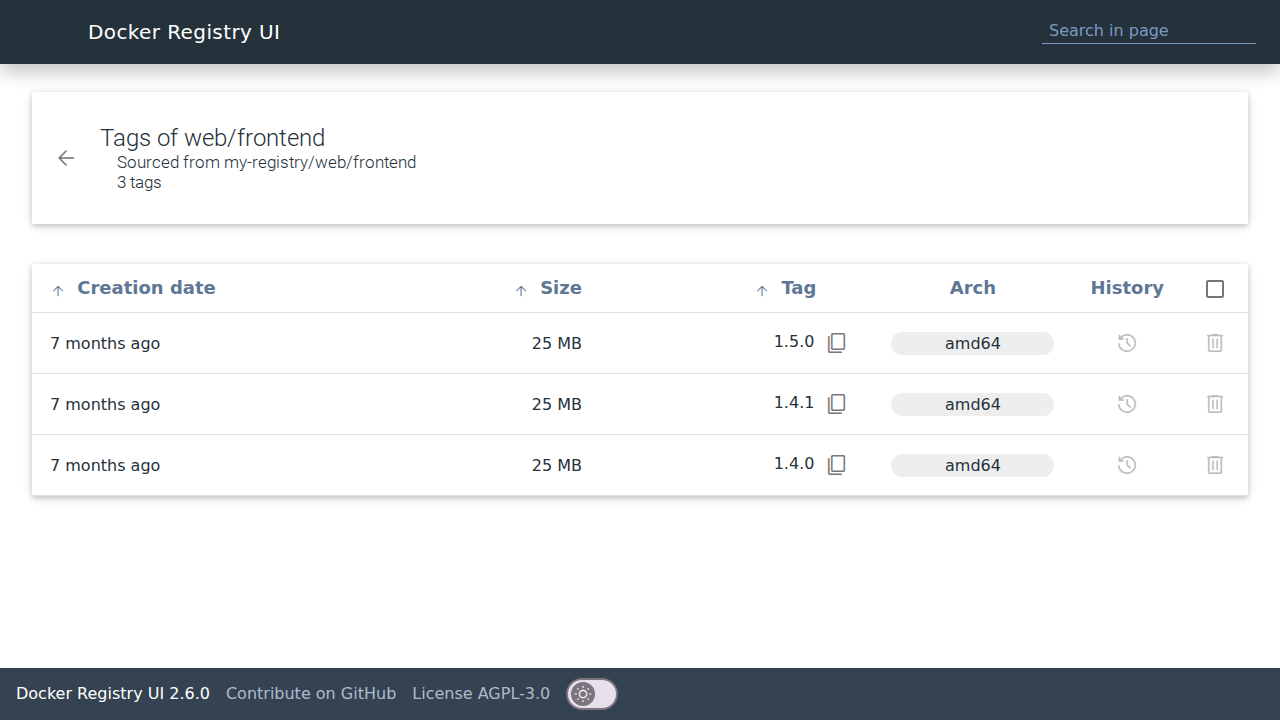
- A web UI on port 8001 for browsing and deleting tags
- Weekly garbage collection that frees the space of deleted tags
- A test image pushed, pulled and deleted again on the VM itself
Running on the VM:
- **Distribution 3.1**: the registry:3.1.2 image in Docker Compose, with no auth of its own, port 8000, data in `~/registry/data`
- **Docker Registry UI 2.6**: joxit/docker-registry-ui, for browsing and deleting tags, port 8001
- **Garbage collection**: a weekly systemd timer that frees the space of deleted tags
How it is reached:
- https://my-registry.exe.xyz/ (private): The registry, for you, people you share the VM with, and exe.dev tokens for this VM
- https://my-registry.exe.xyz:8001/ (private): The web UI
## Deploy with Shelley
Open https://exe-staging.dev/deploy/container-registry/new to create a VM whose agent, Shelley, follows this recipe. From a terminal:
```sh
curl -fsSL https://exe-staging.dev/deploy/container-registry/prompt.txt | ssh exe.dev new --prompt=/dev/stdin
```
Or follow the steps below by hand.
A private registry is where your own images live between `docker build`
and `docker run`: your app, your CI's output, the base images your team
agrees on. This page runs [Distribution](https://github.com/distribution/distribution)
3.1, the registry behind Docker Hub, on an exe.dev VM, with its data on
the VM's disk, a small web UI, and weekly cleanup.
The registry needs no users, passwords or certificates of its own. The
VM is private: exe.dev's [HTTPS proxy](/docs/proxy) answers only you,
people you [share](/docs/sharing) it with, and requests carrying a
[token for this VM](/docs/https-tokens-for-vms), which `docker login`
takes as its password. It's an always-on machine with a real disk, so a
2 GB layer is just a file.
The UI on port 8001, behind exe.dev login, after a few pushes.
## Push your first image
On your computer, make a token that only works for this VM, and log in
with it (the username is ignored):
```bash
ssh exe.dev ssh-key generate-api-key --vm=my-registry --label=registry-laptop --exp=90d --json \
| jq -r .token | docker login my-registry.exe.xyz -u token --password-stdin
```
Docker saves the login like any other registry's. Push something:
```bash
docker pull alpine:3.22
docker tag alpine:3.22 my-registry.exe.xyz/hello:1
docker push my-registry.exe.xyz/hello:1
```
Open `https://my-registry.exe.xyz:8001/` and `hello` is there.
`docker buildx build --push -t my-registry.exe.xyz/app:1 .` works too.
The token lasts 90 days. Revoke it early with
`ssh exe.dev ssh-key remove registry-laptop`, or log in again with a new
one when it runs out.
## Pull from other machines
Give each machine its own token, with its own `--label`, so you can
revoke one without the others. Then:
- **Docker** on another VM or server: the same `docker login`, then
`docker pull my-registry.exe.xyz/hello:1`.
- **[k3s](/deploy/k3s)**: put the token in `/etc/rancher/k3s/registries.yaml`
and restart k3s (`sudo systemctl restart k3s`). Deployments then use
`image: my-registry.exe.xyz/hello:1` with no `imagePullSecrets`.
```yaml
configs:
"my-registry.exe.xyz":
auth:
username: token
password: "exe1.your-token"
```
- **Podman**: `podman login my-registry.exe.xyz -u token`.
- **containerd**: `ctr images pull --user token:exe1.your-token my-registry.exe.xyz/hello:1`.
- **[A remote builder](/deploy/docker-builder)**: `docker login` on the
builder VM, then `docker buildx build --builder exe --push -t my-registry.exe.xyz/app:1 .`
pushes straight from the builder.
On your exe.dev VMs you can skip tokens altogether: a
[VM-to-VM integration](/docs/integrations-vm-to-vm) adds a credential at
exe.dev's edge, so the VM holds none. Create it on your computer and
attach it to the VMs that need images:
```bash
ssh exe.dev integrations add http-proxy --name registry \
--target https://my-registry.exe.xyz/ --peer --attach vm:my-app
```
On `my-app`, `docker pull registry.int.exe.xyz/hello:1` works with no
login. Attach it to a tag (`--attach tag:prod`) and new VMs get it too.
## Push from GitHub Actions
On your computer, make a token for CI and store it as a repository
secret (with the [GitHub CLI](https://cli.github.com), or paste it in
**Settings → Secrets and variables → Actions**):
```bash
ssh exe.dev ssh-key generate-api-key --vm=my-registry --label=registry-ci --exp=1y --json \
| jq -r .token | gh secret set EXE_REGISTRY_TOKEN
```
Then in `.github/workflows/image.yml`:
```yaml
name: image
on:
push:
branches: [main]
jobs:
build:
runs-on: ubuntu-latest
steps:
- uses: actions/checkout@v7
- uses: docker/login-action@v4
with:
registry: my-registry.exe.xyz
username: token
password: ${{ secrets.EXE_REGISTRY_TOKEN }}
- uses: docker/setup-buildx-action@v4
- uses: docker/build-push-action@v7
with:
push: true
tags: my-registry.exe.xyz/${{ github.event.repository.name }}:${{ github.sha }}
```
If your runners are exe.dev VMs ([GitHub Actions on exe.dev](/deploy/github-actions)),
attach the `registry` integration to them instead and push to
`registry.int.exe.xyz/…` with no secret.
## A Docker Hub cache
Docker Hub limits pulls per IP address, and exe.dev VMs share outbound
addresses with other users' VMs. On Nov 19, 2026, Docker Hub gave a
fresh VM 100 pulls an hour, of which 79 were left. A pull-through cache
asks Docker Hub once per image and serves your VMs from its disk after
that.
On the registry VM, run a second Distribution in proxy mode on port 8002:
```bash
mkdir -p ~/hubcache && cd ~/hubcache
cat > config.yml <<'EOF'
version: 0.1
storage:
filesystem:
rootdirectory: /var/lib/registry
delete:
enabled: true
http:
addr: :5000
relativeurls: true
proxy:
remoteurl: https://registry-1.docker.io
ttl: 168h
EOF
cat > compose.yaml <<'EOF'
services:
hubcache:
image: registry:3.1.2
restart: unless-stopped
ports:
- "8002:5000"
volumes:
- ./config.yml:/etc/distribution/config.yml:ro
- ./data:/var/lib/registry
EOF
docker compose up -d
```
Docker can't log in to a mirror, so give your VMs a way in with an
integration, from your computer:
```bash
ssh exe.dev integrations add http-proxy --name dockerhub \
--target https://my-registry.exe.xyz:8002/ --peer --attach vm:my-app
```
Then on `my-app`, make it Docker's mirror for Docker Hub:
```bash
echo '{"registry-mirrors": ["https://dockerhub.int.exe.xyz"]}' | sudo tee /etc/docker/daemon.json
sudo systemctl restart docker
docker pull redis:8-alpine
```
The pull lands in `~/hubcache/data` on the registry VM. For k3s, add a
`docker.io` mirror with that endpoint in `registries.yaml`
([k3s mirrors](https://docs.k3s.io/installation/private-registry#mirrors)).
The cache keeps images a week after their last pull, and it only reads
from Docker Hub; you can't push to it.
## Clean up
Deleting a tag hides it; garbage collection frees the disk. Delete tags
in the UI (the trash icon on a tag's row; it deletes the image, so every
tag pointing at the same image goes too, and the dialog lists them before
you confirm), or one tag at a time on the VM:
```bash
curl -X DELETE localhost:8000/v2/web/api/manifests/2026-10-01
```
That removes only that tag, even if other tags point at the same image.
The `registry-gc` timer runs every Sunday at 04:00 UTC: it stops the
registry for a few seconds, deletes every manifest and layer no tag
needs any more, and starts it again. To run it now:
```bash
sudo systemctl start registry-gc.service
journalctl -u registry-gc --no-pager | grep -E 'marked|eligible' | tail -3
du -sh ~/registry/data
```
In our test, deleting a 400 MB image and collecting took the data from
672 MB to 291 MB in under a second. Multi-arch images survive collection
as long as their index is tagged.
## Disk and backups
Everything is in `~/registry`: `data/` holds the images, the rest is a
few small config files. Check how full the disk is with `df -h /`, and
grow it from your computer:
```bash
ssh exe.dev resize my-registry --disk=100GB
```
then on the VM `sudo resize2fs $(findmnt -no SOURCE /)`.
Image layers never change once written, so a copy only needs the new
files each time. On your computer, or another VM with room:
```bash
rsync -a --delete my-registry.exe.xyz:registry/ ./registry-backup/
```
To restore, copy `registry/` back to a VM set up with "Install by hand"
while its containers are stopped (`docker compose down`), then
`docker compose up -d`. If your images can all be rebuilt from source,
back up just the config files and treat the data as a cache.
## Use zot instead
[zot](https://github.com/project-zot/zot) is an OCI-native registry with
a built-in web UI and search, and retention policies that delete old tags
for you. It sits behind exe.dev the same way. On the VM:
```bash
mkdir -p ~/zot/data && cd ~/zot
cat > config.json <<'EOF'
{
"distSpecVersion": "1.1.1",
"storage": {
"rootDirectory": "/var/lib/registry",
"dedupe": true,
"gc": true,
"gcDelay": "1h",
"gcInterval": "24h",
"retention": {
"delay": "24h",
"policies": [
{
"repositories": ["**"],
"deleteReferrers": true,
"deleteUntagged": true,
"keepTags": [{ "mostRecentlyPushedCount": 10 }]
}
]
}
},
"http": { "address": "0.0.0.0", "port": "5000" },
"log": { "level": "info" },
"extensions": {
"search": { "enable": true },
"ui": { "enable": true }
}
}
EOF
cat > compose.yaml <<'EOF'
services:
zot:
image: ghcr.io/project-zot/zot:v2.1.23
restart: unless-stopped
ports:
- "8003:5000"
volumes:
- ./config.json:/etc/zot/config.json:ro
- ./data:/var/lib/registry
EOF
docker compose up -d
```
The policy keeps the 10 most recently pushed tags of every repository
and deletes the rest a day later. Its UI is `https://my-registry.exe.xyz:8003/`,
and the registry is the same address (`docker login my-registry.exe.xyz:8003`).
To make zot your only
registry, put it on port 8000 instead and stop the Distribution stack
(`cd ~/registry && docker compose down`). We tested zot 2.1.23 with
Docker 29 pushes and pulls through exe.dev.
## The nuts and bolts
Install by hand
### Create the VM
On your computer (pick another name if `my-registry` is taken):
```bash
ssh exe.dev new --name=my-registry
ssh my-registry.exe.xyz
```
The rest runs **on the VM**, as `exedev`.
### Start the registry
Docker starts at boot so the registry does too:
```bash
sudo systemctl enable --now docker.service
mkdir -p ~/registry/data && cd ~/registry
cat > config.yml <<'EOF'
version: 0.1
log:
level: info
storage:
filesystem:
rootdirectory: /var/lib/registry
delete:
enabled: true
cache:
blobdescriptor: inmemory
http:
addr: :5000
relativeurls: true
health:
storagedriver:
enabled: true
interval: 10s
threshold: 3
EOF
cat > compose.yaml </dev/null <<'EOF'
[Unit]
Description=Garbage-collect the registry
After=docker.service
Requires=docker.service
[Service]
Type=oneshot
User=exedev
WorkingDirectory=/home/exedev/registry
ExecStart=/usr/bin/docker compose stop registry
ExecStart=/usr/bin/docker compose run --rm --no-deps registry garbage-collect --delete-untagged /etc/distribution/config.yml
ExecStopPost=/usr/bin/docker compose start registry
EOF
sudo tee /etc/systemd/system/registry-gc.timer >/dev/null <<'EOF'
[Unit]
Description=Garbage-collect the registry weekly
[Timer]
OnCalendar=Sun 04:00 UTC
Persistent=true
[Install]
WantedBy=timers.target
EOF
sudo systemctl daemon-reload
sudo systemctl enable --now registry-gc.timer
sudo systemctl start registry-gc.service
journalctl -u registry-gc --no-pager | grep -E 'marked|eligible' | tail -3
sleep 3; curl -s localhost:8000/v2/smoke/tags/list; echo
```
The journal lists the smoke image's layers as eligible for deletion, and
`smoke` has no tags left (`{"name":"smoke","tags":[]}`). The UI is at
`https://.exe.xyz:8001/`: `printf 'https://%s.exe.xyz:8001/\n' "$(hostname)"`.
Update
The images are pinned. To move to a newer
[Distribution release](https://github.com/distribution/distribution/releases)
or [Docker Registry UI release](https://github.com/Joxit/docker-registry-ui/releases),
change the tag in `~/registry/compose.yaml`, then on the VM:
```bash
cd ~/registry
docker compose pull && docker compose up -d
curl -s localhost:8000/v2/_catalog
```
Do it when nobody is pushing; a push cut off by the restart has to be
run again. Read the release notes before a major version.
Troubleshooting
Start with the logs, on the VM:
```bash
cd ~/registry
docker compose ps
docker compose logs --tail=50 registry
```
- **`401 Unauthorized` from `docker login`**: the token is for another
VM, expired or was revoked. Make a new one with `--vm=my-registry`.
- **`no basic auth credentials` on pull or push**: this machine hasn't
logged in to `my-registry.exe.xyz`, or logged in under another name
(`my-registry.exe.xyz:8000` is a different registry to Docker).
- **Down after a reboot?** `sudo systemctl enable --now docker.service`.
- **Disk full**: delete old tags, run `sudo systemctl start registry-gc.service`,
and grow the disk (see [Disk and backups](#disk-and-backups)).
- **The UI shows no images**: `docker compose logs ui`; it reaches the
registry through `http://registry:5000`.
## Frequently asked questions
### Do I need TLS certificates or a password file?
No. exe.dev's [HTTPS proxy](/docs/proxy) serves the certificate and checks who's calling; the registry runs with no auth of its own and is reachable only through that proxy. `docker login` takes an exe.dev token as the password.
### How much disk does it need?
Layers are stored once however many tags use them. A new VM's 25 GB holds a few dozen typical app images; grow it any time with `ssh exe.dev resize my-registry --disk=100GB`. Disks are billed by what's used, not their size. See [exe.dev pricing](https://exe.dev/pricing).
### Can I give a machine pull-only access?
Tokens from `generate-api-key` can push. For a read-only token, sign one yourself with a `ctx` such as `{"registry":"pull"}` ([local signing](/docs/https-api-local-key)); exe.dev passes it to the VM as an `X-ExeDev-Token-Ctx` header the holder can't change. Then ask Shelley to put nginx in front of the registry that refuses POST, PUT, PATCH and DELETE when that header says pull.
### Distribution or zot?
Distribution (`registry:3`) is the reference registry that Docker Hub grew from: small, boring and everywhere. [zot](https://zotregistry.dev) is OCI-native and has its own UI, search and tag-retention policies that delete old tags for you. Both work the same way behind exe.dev; see [Use zot instead](#use-zot-instead).
### Can I make it public, for anonymous pulls?
`ssh exe.dev share set-public my-registry` would make port 8000 open to anyone, pushes included, because the registry has no auth of its own. For public images, use Docker Hub or GHCR, or put registry htpasswd auth in front before you do.
## Related
- [Run a remote Docker builder with a warm BuildKit cache](https://exe-staging.dev/deploy/docker-builder.md): One big VM with a warm build cache that every laptop and CI job builds on.
- [Use exe.dev as a remote Docker host](https://exe-staging.dev/deploy/docker-host.md): Keep the docker CLI. Send the builds, the containers, and the fan noise to a VM.
- [Run GitHub Actions jobs on exe.dev, a fresh VM per job](https://exe-staging.dev/deploy/github-actions.md): Every job on a fresh copy of a warm VM, billed by the second.
- [Run Kubernetes with k3s](https://exe-staging.dev/deploy/k3s.md): A real Kubernetes cluster on one VM, private until you say otherwise.
- [Deploy a Docker Compose app from GitHub](https://exe-staging.dev/deploy/docker-compose.md): Your compose.yaml on a VM of its own. git push to deploy.
- [Dev, Test, Prod: Choose One, Two, or Three](https://exe-staging.dev/deploy/dev-test-prod.md): You can build, test, and deploy on exe.dev.