
Self-host ClickHouse
Fast SQL analytics on events and logs, on a real disk, private by default.
Shelley handles the setup. About 10 minutes.
Prefer a terminal?
curl -fsSL https://exe-staging.dev/deploy/clickhouse/prompt.txt | ssh exe.dev new --prompt=/dev/stdinClickHouse is a column-oriented SQL database for analytics: product events, logs, metrics, anything you add a lot of and query in aggregate. It's one program with no dependencies, which suits a VM of its own. Here it runs from ClickHouse's packages with its data on the VM's NVMe disk, its HTTP API and Play UI behind your exe.dev login, VM tokens for programs, and nightly backups you've seen restored.
What you get#
- ClickHouse 26.8 LTS from ClickHouse's apt repository, held at 26.8, started at boot, listening on localhost only.
- A password on the
defaultuser, and anappdatabase and user whose settings are in~/clickhouse/app.env. - Memory limits and system log retention sized for a small VM.
- An
app.eventstable ready for events and logs. - The Play UI at
https://<vm>.exe.xyz:8123/play, private behind exe.dev login. - Nightly backups with ClickHouse's BACKUP, one restored and checked.
What's running, and where
https://my-clickhouse.exe.xyz:8123/play
The Play UI, behind exe.dev login and a ClickHouse password
https://my-clickhouse.exe.xyz:8123/
The HTTP API, for programs that send an exe.dev VM token
http://localhost:8123/
The HTTP API for apps on the VM
Deploy with Shelley#
Click Deploy and Shelley will set up ClickHouse on a new VM, then check that it works. No config-file wrangling required.
Prefer a terminal?
curl -fsSL \
  https://exe-staging.dev/deploy/clickhouse/prompt.txt \
  | ssh exe.dev new --prompt=/dev/stdin
When it's done, run this on your computer (only you can):
ssh my-clickhouse.exe.xyz cat clickhouse/admin.env
ssh exe.dev ssh-key generate-api-key --vm=my-clickhouse --label=clickhouse
What Shelley is told
Set up ClickHouse on this VM by following the exe.dev recipe at https://exe-staging.dev/deploy/clickhouse.md?via=deploy from top to bottom.

The recipe's example VM name is my-clickhouse. This VM's name is the output of `hostname`: use it wherever the recipe writes my-clickhouse. Skip the step that creates the VM; you are on it.

You are done when all of these are true. Check each one yourself:
- ClickHouse 26.8 LTS from ClickHouse's apt repository, held at 26.8, started at boot, listening on localhost only.
- A password on the `default` user, and an `app` database and user whose settings are in `~/clickhouse/app.env`.
- Memory limits and system log retention sized for a small VM.
- An `app.events` table ready for events and logs.
- The Play UI at `https://<vm>.exe.xyz:8123/play`, private behind exe.dev login.
- Nightly backups with ClickHouse's BACKUP, one restored and checked.

Read the whole recipe, including the closed details. For initial setup,
follow "Install by hand" from top to bottom, skipping VM creation: the
repository and packages, passwords, the config files, starting
ClickHouse, the app user and events table, the backup timer, and the
restore test. The walkthrough sections are for the owner afterwards:
don't load the taxi demo, set up Tailscale, S3, Grafana or Docker
access, or run the Restore or Update instructions during initial setup.
Never overwrite an existing ~/clickhouse/*.env file. Drop only the
app_restored database the restore test creates.
Leave the VM private and do not reboot. Don't paste passwords into the
chat; say they are in ~/clickhouse/admin.env and ~/clickhouse/app.env.
Finish with https://<vm>.exe.xyz:8123/play and the steps in "Open the
Play UI".

Finish with the URLs I should open and these commands, which only I can run, from my own computer (with this VM's name in them):
  ssh my-clickhouse.exe.xyz cat clickhouse/admin.env
  ssh exe.dev ssh-key generate-api-key --vm=my-clickhouse --label=clickhouse
Also at /deploy/clickhouse/prompt.txt. The recipe it follows is /deploy/clickhouse.md.
Open the Play UI#
When Shelley finishes, open https://my-clickhouse.exe.xyz:8123/play and
sign in to exe.dev. That's ClickHouse's own SQL console, served by
ClickHouse on port 8123; exe.dev's proxy adds HTTPS and lets only you in.
ClickHouse has its own users on top. Print the passwords on your computer:
ssh my-clickhouse.exe.xyz cat clickhouse/admin.env clickhouse/app.env
In the Play UI, click the key at the top right and enter user default and
the password from admin.env. default is the admin and can do anything;
your app uses the app user, which can only use the app database. Run
SELECT version() to see it work.
On the VM itself, clickhouse-client signs in as default with no
questions: on your computer, ssh -t my-clickhouse.exe.xyz clickhouse-client.
For a live view of the server, open
https://my-clickhouse.exe.xyz:8123/dashboard with the same login.
Query 20 million rows#
To see what ClickHouse is for, load the New York taxi sample from ClickHouse's example datasets: 20 million trips, read straight from a public S3 bucket. On the VM:
clickhouse-client --multiquery <<'SQL'
CREATE DATABASE IF NOT EXISTS nyc_taxi;
CREATE TABLE IF NOT EXISTS nyc_taxi.trips (
    trip_id             UInt32,
    pickup_datetime     DateTime,
    dropoff_datetime    DateTime,
    pickup_longitude    Nullable(Float64),
    pickup_latitude     Nullable(Float64),
    dropoff_longitude   Nullable(Float64),
    dropoff_latitude    Nullable(Float64),
    passenger_count     UInt8,
    trip_distance       Float32,
    fare_amount         Float32,
    extra               Float32,
    tip_amount          Float32,
    tolls_amount        Float32,
    total_amount        Float32,
    payment_type        Enum('CSH' = 1, 'CRE' = 2, 'NOC' = 3, 'DIS' = 4, 'UNK' = 5),
    pickup_ntaname      LowCardinality(String),
    dropoff_ntaname     LowCardinality(String)
)
ENGINE = MergeTree
ORDER BY (pickup_datetime, dropoff_datetime);
SQL
clickhouse-client --time -q "INSERT INTO nyc_taxi.trips SELECT * FROM s3('https://datasets-documentation.s3.eu-west-3.amazonaws.com/nyc-taxi/trips_{0..19}.gz', NOSIGN, 'TabSeparatedWithNames')"
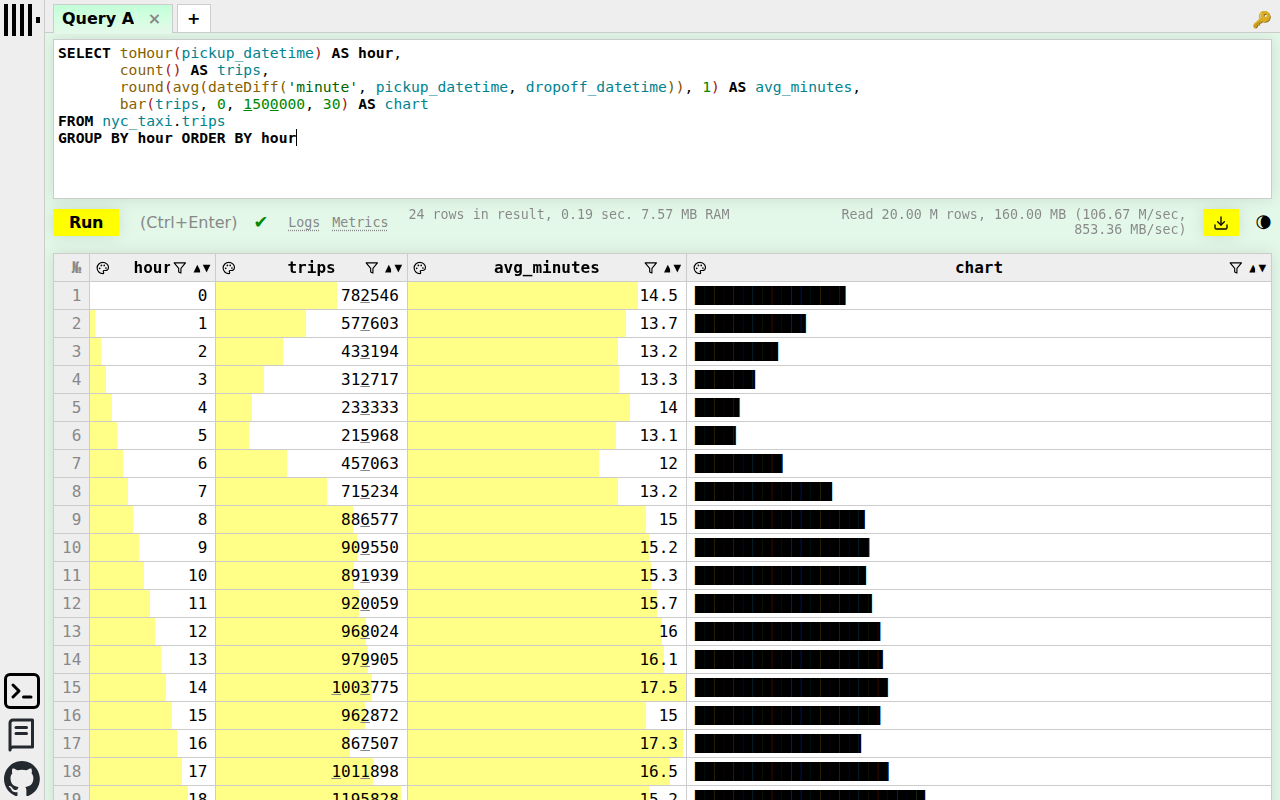
On our 2-CPU test VM that took 52 seconds and 400 MB of memory, and the table takes 770 MB of disk. Now ask it something in the Play UI:
SELECT toHour(pickup_datetime) AS hour,
       count() AS trips,
       round(avg(dateDiff('minute', pickup_datetime, dropoff_datetime)), 1) AS avg_minutes,
       bar(trips, 0, 1500000, 30) AS chart
FROM nyc_taxi.trips
GROUP BY hour ORDER BY hour
Or the busiest pickup neighborhoods and what their rides cost:
SELECT pickup_ntaname AS neighborhood,
       count() AS trips,
       round(avg(total_amount), 2) AS avg_fare
FROM nyc_taxi.trips
WHERE pickup_ntaname != ''
GROUP BY neighborhood ORDER BY trips DESC LIMIT 10
Each reads all 20 million rows and answers in well under half a second.
That's the columnar layout at work: a query reads only the columns it names,
compressed. Drop the demo when you're done: DROP DATABASE nyc_taxi.
Ask Shelley about your data#
You don't have to write the SQL. Shelley, the agent on your VM at
https://my-clickhouse.shelley.exe.xyz/, runs clickhouse-client as the
admin, so it can look at your tables, write the queries, check the numbers,
and answer in plain language. With the taxi demo loaded, we asked it:
Which taxi pickup neighborhoods tip best in my ClickHouse, and are late-night riders any different?
In about a minute, after several queries and a look at the dataset's documentation, it answered with tables. Shortened:
Midtown–Midtown South tipped the highest share of fare (20.73%). Carroll Gardens–Columbia Street–Red Hook tipped the most dollars per ride ($3.44), excluding airports. Late-night riders tipped a slightly smaller share of the fare, but only about two cents less per ride.
Pickup neighborhood Tip share Avg. tip per ride Rides Midtown–Midtown South 20.73% $2.57 1,980,939 Turtle Bay–East Midtown 20.61% $2.49 828,364 Park Slope–Gowanus 20.46% $3.04 19,223 Data caveat: The local payment labels appear reversed:
CSH[…] contains virtually all recorded tips; NYC TLC defines1as credit card and says cash tips aren't captured. […] The results describe recorded card tips, not cash tipping.
That caveat is right: the sample dataset swaps the cash and card labels, and Shelley noticed before drawing conclusions from them. Ask about your own data the same way: "how many signups did we get last week, and from where?", "which events grew fastest this month?", "why is this query slow?", "what's using the disk?". Shelley can change things as well as read them, so it can add a table or a materialized view when you ask. If you only want answers, say so.
Send events from your app#
Setup made an app.events table: a time, an event name, a user, and a
JSON column
for anything else, ordered by (name, ts) and kept for a year. An app on
the VM sends it batches of JSON lines at http://localhost:8123, with the
user and password in ~/clickhouse/app.env:
set -a; . ~/clickhouse/app.env; set +a
printf '%s\n' \
  '{"name":"signup","user_id":"u1","properties":{"plan":"free","referrer":"hn"}}' \
  '{"name":"page_view","user_id":"u1","properties":{"path":"/pricing"}}' |
  curl -sS --fail-with-body "$CLICKHOUSE_URL/" -u "$CLICKHOUSE_USER:$CLICKHOUSE_PASSWORD" \
    --url-query "database=$CLICKHOUSE_DATABASE" \
    --url-query 'query=INSERT INTO events FORMAT JSONEachRow' --data-binary @-
Then SELECT name, properties.plan FROM app.events in the Play UI shows
them. In code, use ClickHouse's
client for your language
with the same settings, and send thousands of rows per insert where you
can. Where you can't, ClickHouse 26.8's
asynchronous inserts,
on by default, batch them on the server. For another app's database,
~/clickhouse/create-user.sh blog makes a blog database and user and
writes ~/clickhouse/blog.env.
Connect from your computer#
Port 8123 is private: a browser gets the exe.dev login page, and a program
without credentials gets 401. Programs get through with an exe.dev
VM token in an X-Exedev-Authorization
header. The proxy checks the token and removes the header, then
ClickHouse checks its own user and password as usual. On your computer,
make a token for this VM:
ssh exe.dev ssh-key generate-api-key --vm=my-clickhouse --label=clickhouse --exp=90d
Save it as EXE_TOKEN and the app password as CLICKHOUSE_PASSWORD in
your shell, then:
curl -sS https://my-clickhouse.exe.xyz:8123/ \
  -H "X-Exedev-Authorization: Bearer $EXE_TOKEN" \
  -H 'X-ClickHouse-User: app' -H "X-ClickHouse-Key: $CLICKHOUSE_PASSWORD" \
  --data-binary 'SELECT currentUser(), version()'
Expect app and 26.8.... ClickHouse's own clients take extra headers.
In Python, with pip install clickhouse-connect:
import os, clickhouse_connect

client = clickhouse_connect.get_client(
    host="my-clickhouse.exe.xyz", port=8123, secure=True,
    username="app", password=os.environ["CLICKHOUSE_PASSWORD"], database="app",
    headers={"X-Exedev-Authorization": "Bearer " + os.environ["EXE_TOKEN"]},
)
print(client.query("SELECT count() FROM events").result_rows)
In Node.js, with npm install @clickhouse/client:
import { createClient } from '@clickhouse/client'

const client = createClient({
  url: 'https://my-clickhouse.exe.xyz:8123',
  username: 'app',
  password: process.env.CLICKHOUSE_PASSWORD,
  database: 'app',
  http_headers: { 'X-Exedev-Authorization': `Bearer ${process.env.EXE_TOKEN}` },
})
await client.insert({ table: 'events', values: [{ name: 'signup', user_id: 'u2' }], format: 'JSONEachRow' })
We ran both, clickhouse-connect 1.13 and @clickhouse/client 1.25, and
sent a 22 MB batch of 300,000 events with curl in two seconds (compress it
with -H 'Content-Encoding: gzip' and it's faster still). Both kinds of
password travel safely together: the token in X-Exedev-Authorization,
ClickHouse's in its own headers or the usual Authorization: Basic. Add
--ips=203.0.113.7/32 to the token command to accept it from one address
only.
clickhouse-client and desktop tools#
clickhouse-client and most desktop tools use the native protocol on port
9000, which doesn't go through an HTTPS proxy. Tunnel it over SSH, and leave
this running on your computer:
ssh -N -L 9000:localhost:9000 my-clickhouse.exe.xyz
Then connect to localhost:9000 with the user and password, for example
clickhouse client --user app --password with ClickHouse installed on your
computer. DBeaver and DataGrip can also use the HTTP URL above if they let
you add a header, or open the SSH tunnel themselves.
Connect from another VM#
For an app on another exe.dev VM, the
VM-to-VM integration keeps the token off
that VM: exe.dev adds it at the edge. On your computer, with the app's VM
called my-app:
ssh exe.dev integrations add http-proxy --name clickhouse \
  --target https://my-clickhouse.exe.xyz:8123/ --peer --attach vm:my-app
The app then uses https://clickhouse.int.exe.xyz (port 443) as its
ClickHouse URL, with the app user and password, and no token.
For the native protocol, put both VMs on your Tailscale network; it's preinstalled. On both VMs:
sudo systemctl enable --now tailscaled
sudo tailscale up --hostname=$(hostname)
Open the login URL it prints (or join without one through exe.dev's Tailscale integration). Then let ClickHouse listen on every interface, on the ClickHouse VM:
echo '<clickhouse><listen_host>::</listen_host></clickhouse>' | sudo tee /etc/clickhouse-server/config.d/30-listen.xml
sudo systemctl restart clickhouse-server
The other VM reaches it as my-clickhouse:9000 (native) or
http://my-clickhouse:8123. Nothing outside the VM reaches it except
through exe.dev's proxy and your tailnet, and every ClickHouse user has a
password. Use Tailscale's access rules
if not every device on your tailnet should reach it.
Dashboards with Grafana#
The Play UI is for asking questions; for dashboards that refresh themselves, use Grafana with the official ClickHouse data source. Run Grafana from the Grafana page, on this VM or another one on your tailnet, and give it a user that can only read. On the VM:
pass=$(openssl rand -hex 24)
clickhouse-client --param_pass="$pass" --multiquery -q "
  CREATE USER grafana IDENTIFIED WITH sha256_password BY {pass:String};
  GRANT SELECT ON app.* TO grafana;"
(umask 077; echo "CLICKHOUSE_PASSWORD=$pass" > ~/clickhouse/grafana.env)
In Grafana, add the ClickHouse data source with server localhost (or
my-clickhouse over Tailscale), port 8123, protocol HTTP, user grafana,
and that password.
Keep your data#
Every night, ClickHouse's own
BACKUP writes
every database, plus the users and grants, to a zip file in
/var/lib/clickhouse-backups; the newest 14 stay. A backup on the same disk
won't survive losing the VM, so keep a copy somewhere else. On your
computer:
rsync -av my-clickhouse.exe.xyz:/var/lib/clickhouse-backups/ clickhouse-backups/
scp 'my-clickhouse.exe.xyz:clickhouse/*.env' clickhouse-backups/
The .env files hold the passwords your apps use; keep them private. Or
let ClickHouse send each night's backup to an S3 bucket
(Back up to S3), such as your own on
another VM. exe.dev can also back up the whole VM
disk to your S3 bucket with VM backups.
Something odd? On the VM,
sudo tail -n 50 /var/log/clickhouse-server/clickhouse-server.err.log
usually explains it, or ask Shelley to look.
The nuts and bolts#
Happy clicking Deploy? You can stop here. These are the same setup steps Shelley follows, plus the maintenance commands for later.
Install by hand
Create a VM#
On your computer (pick another name if my-clickhouse is taken):
ssh exe.dev new --name=my-clickhouse
ssh my-clickhouse.exe.xyz
Planning on more than 15 GB of data? Make the disk bigger now, with
--disk=100GB on new, or later with
ssh exe.dev resize my-clickhouse --disk=100GB. All remaining commands run
on the VM, as exedev.
Install ClickHouse 26.8 LTS#
Add ClickHouse's apt repository on its lts channel, and hold the packages
at 26.8, so apt upgrade brings fixes but never a new major version:
sudo apt-get update
sudo apt-get install -y apt-transport-https ca-certificates curl gnupg
curl -fsSL 'https://packages.clickhouse.com/rpm/lts/repodata/repomd.xml.key' | sudo gpg --dearmor --yes -o /usr/share/keyrings/clickhouse-keyring.gpg
echo "deb [signed-by=/usr/share/keyrings/clickhouse-keyring.gpg arch=$(dpkg --print-architecture)] https://packages.clickhouse.com/deb lts main" | sudo tee /etc/apt/sources.list.d/clickhouse.list
sudo tee /etc/apt/preferences.d/clickhouse >/dev/null <<'EOF'
Package: clickhouse-*
Pin: version 26.8.*
Pin-Priority: 1001
EOF
sudo apt-get update
sudo DEBIAN_FRONTEND=noninteractive apt-get install -y clickhouse-server clickhouse-client
clickhouse-client --version
Expect ClickHouse client version 26.8.... The package enables the
service but doesn't start it, and its default user has no password yet,
so set things up before starting it.
Set the passwords#
Give the default user a password, stored as a hash in ClickHouse's config
and in plain text in ~/clickhouse/admin.env, which only you can read.
clickhouse-client reads it from its own config file, so it signs in
without asking:
mkdir -p -m 700 ~/clickhouse ~/.clickhouse-client
[ -e ~/clickhouse/admin.env ] || (umask 077; echo "CLICKHOUSE_PASSWORD=$(openssl rand -hex 24)" > ~/clickhouse/admin.env)
. ~/clickhouse/admin.env
hash=$(printf %s "$CLICKHOUSE_PASSWORD" | sha256sum | cut -d' ' -f1)
sudo tee /etc/clickhouse-server/users.d/default-password.xml >/dev/null <<EOF
<clickhouse>
    <users>
        <default>
            <password remove="1" />
            <password_sha256_hex>$hash</password_sha256_hex>
        </default>
    </users>
</clickhouse>
EOF
(umask 077; cat > ~/.clickhouse-client/config.xml <<EOF
<config>
    <user>default</user>
    <password>$CLICKHOUSE_PASSWORD</password>
</config>
EOF
)
The password matters even though ClickHouse listens on localhost only: exe.dev's proxy delivers your browser's requests to it on localhost, so without a password anyone you share the VM with would be an admin.
Size it for the VM#
ClickHouse uses up to 90% of RAM by default, and each of its caches up to
half. This file leaves a quarter of the memory to the rest of the VM
(the page cache ClickHouse reads through, SSH, Shelley, your app) and
keeps each cache to a quarter. It also gives ClickHouse's own logs of
queries and metrics an expiry: they're tables in the system database, and
without one they grow by a couple of hundred MB a day on an idle server.
sudo tee /etc/clickhouse-server/config.d/10-exe-dev.xml >/dev/null <<'EOF'
<clickhouse>
    <!-- Leave a quarter of the VM's memory for everything else: the page
         cache ClickHouse reads through, SSH, Shelley, and your apps. -->
    <max_server_memory_usage_to_ram_ratio>0.75</max_server_memory_usage_to_ram_ratio>
    <!-- Let each of ClickHouse's caches take a quarter of RAM, not half. -->
    <cache_size_to_ram_max_ratio>0.25</cache_size_to_ram_max_ratio>

    <!-- ClickHouse logs its own queries and metrics into system tables
         that otherwise grow forever. Keep queries for 30 days, metrics
         and traces for 7. -->
    <query_log><ttl>event_date + INTERVAL 30 DAY DELETE</ttl></query_log>
    <query_views_log><ttl>event_date + INTERVAL 30 DAY DELETE</ttl></query_views_log>
    <part_log><ttl>event_date + INTERVAL 30 DAY DELETE</ttl></part_log>
    <error_log><ttl>event_date + INTERVAL 30 DAY DELETE</ttl></error_log>
    <query_thread_log><ttl>event_date + INTERVAL 7 DAY DELETE</ttl></query_thread_log>
    <text_log><ttl>event_date + INTERVAL 7 DAY DELETE</ttl></text_log>
    <trace_log><ttl>event_date + INTERVAL 7 DAY DELETE</ttl></trace_log>
    <metric_log><ttl>event_date + INTERVAL 7 DAY DELETE</ttl></metric_log>
    <query_metric_log><ttl>event_date + INTERVAL 7 DAY DELETE</ttl></query_metric_log>
    <asynchronous_metric_log><ttl>event_date + INTERVAL 7 DAY DELETE</ttl></asynchronous_metric_log>
    <background_schedule_pool_log><ttl>event_date + INTERVAL 7 DAY DELETE</ttl></background_schedule_pool_log>
</clickhouse>
EOF
Both limits are ratios, so they follow the VM when you resize it. Queries
that need more memory than they're allowed spill big GROUP BYs and sorts
to disk rather than fail; that's on by default in 26.8.
Add a disk called backups for the nightly backups:
sudo install -d -o clickhouse -g clickhouse -m 750 /var/lib/clickhouse-backups
sudo tee /etc/clickhouse-server/config.d/20-backups.xml >/dev/null <<'EOF'
<clickhouse>
    <storage_configuration>
        <disks>
            <backups>
                <type>local</type>
                <path>/var/lib/clickhouse-backups/</path>
            </backups>
        </disks>
    </storage_configuration>
    <backups>
        <allowed_disk>backups</allowed_disk>
        <allowed_path>/var/lib/clickhouse-backups/</allowed_path>
    </backups>
</clickhouse>
EOF
sudo usermod -aG clickhouse $USER
The last line lets you read the backups (from your next login), to copy them off the VM.
Start ClickHouse#
sudo systemctl enable --now clickhouse-server
timeout 60 sh -c 'until curl -sf http://localhost:8123/ping >/dev/null; do sleep 1; done'
clickhouse-client -q 'SELECT version(), formatReadableSize(getServerSetting($$max_server_memory_usage$$))'
curl -s -o /dev/null -w '%{http_code}\n' http://localhost:8123/ --data-binary 'SELECT 1'
ss -ltn | grep -E ':(8123|9000) '
Expect the version and a memory limit of three quarters of the VM's RAM
(5.25 GiB on an 8 GB VM); then 401, because ClickHouse refuses a request
without a password; then ports 8123 and 9000 on 127.0.0.1 and [::1] only.
Create a database for your app#
This script creates a database and a user with the same name. The user can
do anything in its database and nothing elsewhere. Its settings go to
~/clickhouse/<name>.env, and an existing one is never touched:
cat > ~/clickhouse/create-user.sh <<'EOS'
#!/usr/bin/env bash
# Usage: create-user.sh NAME
# Create a ClickHouse database and a user called NAME that can do anything
# in it (and nothing else), and write its settings to ~/clickhouse/NAME.env.
set -euo pipefail
name=${1:?usage: create-user.sh NAME}
[[ $name =~ ^[a-z_][a-z0-9_]*$ ]] || { echo "Use lowercase letters, digits, and _." >&2; exit 1; }
env="$HOME/clickhouse/$name.env"
if [ -e "$env" ]; then echo "$env already exists; leaving $name alone."; exit 0; fi
pass=$(openssl rand -hex 24)
clickhouse-client --multiquery --param_pass="$pass" <<SQL
CREATE DATABASE IF NOT EXISTS $name;
CREATE USER $name IDENTIFIED WITH sha256_password BY {pass:String};
GRANT ALL ON $name.* TO $name;
SQL
(umask 077; cat > "$env" <<EOF
CLICKHOUSE_URL=http://localhost:8123
CLICKHOUSE_USER=$name
CLICKHOUSE_PASSWORD=$pass
CLICKHOUSE_DATABASE=$name
EOF
)
echo "$env"
EOS
chmod +x ~/clickhouse/create-user.sh
~/clickhouse/create-user.sh app
Create the events table as the app user, and record one event:
set -a; . ~/clickhouse/app.env; set +a
ch() { curl -sS --fail-with-body "$CLICKHOUSE_URL/" -u "$CLICKHOUSE_USER:$CLICKHOUSE_PASSWORD" --url-query "database=$CLICKHOUSE_DATABASE" --data-binary "$1"; }
ch "CREATE TABLE IF NOT EXISTS events (
    ts         DateTime64(3) DEFAULT now64(),
    name       LowCardinality(String),
    user_id    String,
    properties JSON
)
ENGINE = MergeTree
PARTITION BY toYYYYMM(ts)
ORDER BY (name, ts)
TTL toDateTime(ts) + INTERVAL 1 YEAR"
ch "INSERT INTO events (name, user_id, properties) VALUES ('installed', '$(hostname)', '{\"version\":\"26.8\"}')"
ch 'SELECT currentUser(), name, properties.version FROM events'
ch 'CREATE DATABASE other' 2>/dev/null | grep -o ACCESS_DENIED || true
stat -c '%a %n' ~/clickhouse/*.env
Expect app installed 26.8, then ACCESS_DENIED, because app can't
touch anything outside its database, then 600 for both .env files.
Check the Play UI#
On the VM, the Play UI and the HTTP API answer on port 8123:
curl -s -o /dev/null -w '%{http_code}\n' http://localhost:8123/play
Expect 200. From outside, https://<vm>.exe.xyz:8123/play is the same
page behind exe.dev login; a request without login or token gets 401.
Set up nightly backups#
This script backs up every database, and the users, roles and grants made
with SQL, into one zip file on the backups disk, and keeps the 14 newest.
If ~/clickhouse/s3.env exists, it also sends a copy to S3
(Back up to S3).
cat > ~/clickhouse/backup.sh <<'EOS'
#!/usr/bin/env bash
# Back up every database, plus the users, roles and grants made with SQL,
# to /var/lib/clickhouse-backups/<UTC time>.zip, and to S3 if
# ~/clickhouse/s3.env exists. Keeps the 14 newest local backups.
set -euo pipefail
keep=14
dir=/var/lib/clickhouse-backups
name=$(date -u +%Y%m%d-%H%M%S)
what="TABLE system.users, TABLE system.roles, TABLE system.settings_profiles,
  TABLE system.row_policies, TABLE system.quotas, TABLE system.functions,
  ALL EXCEPT DATABASES system, information_schema, INFORMATION_SCHEMA"
clickhouse-client -q "BACKUP $what TO Disk('backups', '$name.zip')" >/dev/null
if [ -e "$HOME/clickhouse/s3.env" ]; then
  . "$HOME/clickhouse/s3.env"
  clickhouse-client --param_url="${S3_URL%/}/$name/" --param_key="$S3_ACCESS_KEY" --param_secret="$S3_SECRET_KEY" \
    -q "BACKUP $what TO S3({url:String}, {key:String}, {secret:String})" >/dev/null
fi
sudo find "$dir" -maxdepth 1 -name '2*.zip' | sort | head -n -"$keep" | xargs -r sudo rm -f --
echo "$dir/$name.zip"
EOS
chmod +x ~/clickhouse/backup.sh
Schedule it for every night, then take a first backup:
sudo tee /etc/systemd/system/clickhouse-backup.service >/dev/null <<EOF
[Unit]
Description=Back up ClickHouse to /var/lib/clickhouse-backups
After=clickhouse-server.service

[Service]
Type=oneshot
User=$USER
ExecStart=$HOME/clickhouse/backup.sh
EOF
sudo tee /etc/systemd/system/clickhouse-backup.timer >/dev/null <<'EOF'
[Unit]
Description=Back up ClickHouse every night

[Timer]
OnCalendar=*-*-* 03:30:00
RandomizedDelaySec=30m
Persistent=true

[Install]
WantedBy=timers.target
EOF
sudo systemctl daemon-reload
sudo systemctl enable --now clickhouse-backup.timer
sudo systemctl start clickhouse-backup.service
systemctl list-timers clickhouse-backup.timer
sudo ls -l /var/lib/clickhouse-backups
Expect a next run time and one .zip file. For failures:
journalctl -u clickhouse-backup.service.
Test a backup#
Restore the newest backup's app database next to the real one, and
compare:
latest=$(sudo ls -1 /var/lib/clickhouse-backups | grep '^2.*\.zip$' | tail -n 1)
clickhouse-client -q "RESTORE DATABASE app AS app_restored FROM Disk('backups', '$latest')"
clickhouse-client -q "SELECT (SELECT count() FROM app.events) AS live, (SELECT count() FROM app_restored.events) AS restored"
clickhouse-client -q "DROP DATABASE app_restored SYNC"
Expect RESTORED, then 1 1. Installation done;
continue with Open the Play UI.
Back up and restore
On the VM, ~/clickhouse/backup.sh takes an extra backup and prints its
file. Backups are plain zip files with each table's SQL and data parts
inside; sudo unzip -l lists them.
Undo a mistake#
Dropped a table or deleted the wrong rows? Restore it from a backup next to the live one, under a new name. On the VM:
sudo ls /var/lib/clickhouse-backups/
clickhouse-client -q "RESTORE TABLE app.events AS app.events_restored FROM Disk('backups', '20261121-033012.zip')"
Copy back what you need with INSERT INTO app.events SELECT ... FROM app.events_restored WHERE ..., or swap the tables with EXCHANGE TABLES app.events AND app.events_restored, then drop the one you don't want.
RESTORE DATABASE app AS app_restored works the same way for a whole
database.
Restore everything on a new VM#
On a new VM, follow Install by hand up to and including
"Start ClickHouse". Then copy a backup and the .env files over. On your
computer:
scp clickhouse-backups/20261121-033012.zip clickhouse-backups/*.env my-clickhouse.exe.xyz:
On the VM, put the backup on the backups disk and restore the users and
every database from it:
sudo install -o clickhouse -g clickhouse -m 640 ~/20261121-033012.zip /var/lib/clickhouse-backups/
clickhouse-client -q "RESTORE ALL FROM Disk('backups', '20261121-033012.zip')"
cp --update=none ~/*.env ~/clickhouse/ && chmod 600 ~/clickhouse/*.env && rm ~/*.env ~/20261121-033012.zip
clickhouse-client -q 'SHOW DATABASES'
clickhouse-client -q 'SHOW USERS'
Your databases and users are back, with their old passwords, so the
.env files work unchanged. Don't copy admin.env's password over the new
one: the new VM's default password is in its own admin.env. Then
continue Install by hand from "Set up nightly backups".
Back up to S3#
A backup that leaves the VM survives losing it. ClickHouse writes backups straight to any S3-compatible bucket: AWS S3, Cloudflare R2, Backblaze B2, or your own on another VM on your Tailscale network. Make a bucket and a key that can write to it, then on the VM:
(umask 077; cat > ~/clickhouse/s3.env <<'EOF'
S3_URL=https://your-bucket.s3.us-east-1.amazonaws.com/clickhouse
S3_ACCESS_KEY=...
S3_SECRET_KEY=...
EOF
)
~/clickhouse/backup.sh
Each night then also writes a full backup to <S3_URL>/<time>/. Expire old
ones with your bucket's lifecycle rules. ClickHouse hides the secret key in
its query log. To restore from S3, use the same URL and keys:
RESTORE DATABASE app AS app_restored
FROM S3('https://your-bucket.s3.us-east-1.amazonaws.com/clickhouse/20261121-033012/', 'KEY', 'SECRET')
A bucket on a private exe.dev VM's HTTPS URL won't work here: ClickHouse can't add the VM token. Use Tailscale, as the S3 page explains.
The whole VM#
VM backups copy the VM's entire disk to your own S3 bucket, incrementally. ClickHouse never rewrites a data part in place, so a disk snapshot of a running server comes back like after a power cut. The zip files above are still the easiest way to bring back one table.
Update ClickHouse
ClickHouse ships LTS releases twice a year and supports each for a year: 26.8 came out on August 30, 2026. Fixes for it arrive several times a week.
Updates within 26.8#
On the VM, back up, then upgrade the packages and restart. Queries fail for the few seconds ClickHouse takes to come back:
~/clickhouse/backup.sh
sudo apt-get update
sudo DEBIAN_FRONTEND=noninteractive apt-get install --only-upgrade -y -o Dpkg::Options::=--force-confold \
  clickhouse-server clickhouse-client clickhouse-common-static
sudo systemctl restart clickhouse-server
timeout 60 sh -c 'until curl -sf http://localhost:8123/ping >/dev/null; do sleep 1; done'
clickhouse-client -q 'SELECT version()'
The packages don't restart the server themselves; until you do, the old version keeps running.
A new LTS#
When the next LTS comes out, read the "Backward Incompatible Change"
entries in the changelog
for every release in between. Then back up, change the version in
/etc/apt/preferences.d/clickhouse (Pin: version 27.3.*, say), and run
the commands above with apt-get install in place of
apt-get install --only-upgrade. Data written by a newer version may not
be readable by an older one, so the backup is your way back.
Something not working?
On the VM, ClickHouse's error log usually has the answer:
systemctl status clickhouse-server
sudo tail -n 50 /var/log/clickhouse-server/clickhouse-server.err.log
Authentication failed(code 516, or 194 with no password): wrong user or password, or none. Theapppassword is in~/clickhouse/app.env, thedefaultone in~/clickhouse/admin.env. Through the proxy, a Basic auth header with the VM token as password is taken by exe.dev, and ClickHouse sees no password: send the token inX-Exedev-Authorizationinstead.401frommy-clickhouse.exe.xyz:8123: exe.dev wants a login or a token. Check the header name and that the token was made with--vm=my-clickhouseand hasn't expired.MEMORY_LIMIT_EXCEEDED: a query wanted more than the server's limit. Narrow it (fewer columns, aWHEREon the table'sORDER BYcolumns), or give the VM more memory withssh exe.dev resize my-clickhouse --memory=16GB; the limit follows.S3 access ... is not allowed to use the server's own credentials: addNOSIGNfor a public bucket, as in the taxi demo, or pass a key and secret.Too many parts: something inserts one row at a time with asynchronous inserts turned off. Batch the inserts, or leaveasync_inserton.- Disk filling up: see what takes the space with
clickhouse-client -q "SELECT database, table, formatReadableSize(sum(bytes_on_disk)) AS size FROM system.parts WHERE active GROUP BY database, table ORDER BY sum(bytes_on_disk) DESC LIMIT 10"andsudo du -sh /var/lib/clickhouse-backups. Add aTTLto big tables, lowerkeepin~/clickhouse/backup.sh, or grow the disk withssh exe.dev resize my-clickhouse --disk=100GB. - It won't start after a config change: the error log names the file
and line. Fix or remove the file in
/etc/clickhouse-server/config.d/. - The SSH tunnel says
Address already in use: something on your computer has port 9000. Use another,-L 9001:localhost:9000, and connect to port 9001.
Frequently asked questions#
How much does it cost to self-host ClickHouse on exe.dev?
ClickHouse is free and open source under Apache 2.0. You pay for your exe.dev plan, and for a bigger disk if your data outgrows the 25 GB a new VM starts with. ClickHouse compresses well: the 20 million taxi trips in the demo take 770 MB.
How big a VM does ClickHouse need?
Less than you'd think. We loaded 20 million rows in under a minute and queried them in a fraction of a second on a 2-CPU, 8 GB VM. Memory limits here are ratios of the VM's RAM, so they follow the VM when you resize it. Disk is usually what you grow first.
Can I connect to port 9000 or 8123 from the internet?
Why not ClickHouse Cloud?
ClickHouse Cloud scales out, separates storage and compute, and runs upgrades for you. A VM is simpler and cheaper for one app's events or logs: a fixed price, data on a local NVMe disk, root access to every setting, and nothing public unless you open it.
Can I run it in Docker instead?
Yes. The official image is clickhouse/clickhouse-server:26.8; mount /var/lib/clickhouse and /etc/clickhouse-server/config.d from the VM, publish 127.0.0.1:8123:8123, and set CLICKHOUSE_PASSWORD. This page uses the apt packages because they come with clickhouse-client and a systemd service, and upgrade with apt.
Does ClickHouse replace PostgreSQL?
No, it sits next to it. Keep users, orders and anything you update row by row in PostgreSQL. Send ClickHouse the append-only firehose: events, logs, metrics, traces. It answers questions over millions of rows in milliseconds, but updates and deletes are slow, batch operations.
Published Nov 21, 2026 · Updated Nov 21, 2026 · tested end to end Nov 21, 2026 · Markdown · manifest.json · Something wrong? Tell us


